
PCB Automation
How To Select A PCB TRAY Loader And Unloader
Select a PCB TRAY loader around your panels, carriers and line interfaces. Fast transfer cannot resolve an incompatible tray. Start with representative samples, define recovery behaviour, and agree acceptance checks before ordering.
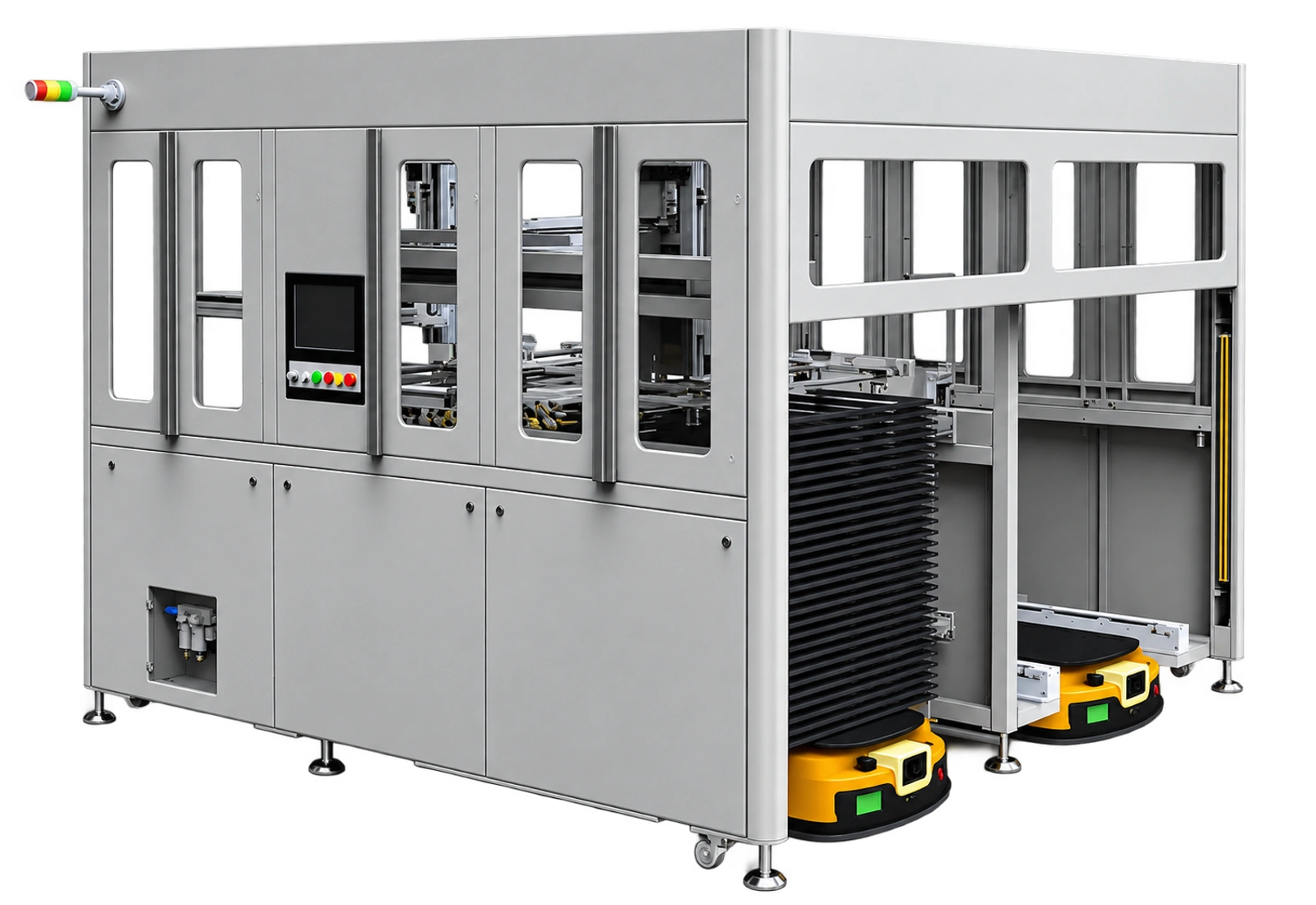
What Does A PCB TRAY Loader Do?
A PCB TRAY loader transfers panels between a tray-based carrier and a production process.
You need to define tray arrival, panel pickup, machine handoff and empty-tray return. Include buffering and operator access. Chengtai offers TRAY loading and unloading equipment for controlled PCB material flow.
Which Panel And Tray Details Matter?
Your panel and tray drawings define the handling interface.
Record panel dimensions, thickness, weight and allowable contact areas. Include warped panels and surface-sensitive products in your sample set. Specify tray pitch, pocket dimensions, stack height and identification. Mixed products may require adjustable tooling or separate recipes.
How Should You Specify Integration?
Your integration specification should cover timing, machine signals and fault recovery.
Define ready, busy, complete and fault states with the connected equipment supplier. Agree what happens when either machine stops. For AGV delivery or MES records, specify docking, identifiers and data fields. These interfaces require project confirmation.
How Do You Validate Handling Quality?
You should validate handling with representative panels under normal and interrupted operating conditions.
Inspect agreed contact areas before and after repeated transfers. Include empty trays, missing panels, incorrect orientation and upstream stoppages. Record recovery actions. Where your product requires ESD controls, verify the complete handling path. The EOS/ESD Association explains grounding and charge-control principles for sensitive items. Bare-board requirements depend on your process.
When Is A TRAY Loader Unsuitable?
A TRAY loader may be unsuitable when your production flow uses another carrier system.
Compare magazines, inclined racks and boxes against your routing. Unstable trays or large product variation can increase engineering work. Evaluate changeover time, maintenance access, spare tooling and integration costs alongside purchase price.
How Do You Map The Complete TRAY Handling Cycle?
You should map every carrier and panel movement before selecting the loader configuration.
Start at the point where an operator or vehicle delivers a loaded tray. Follow the tray through identification, locating and panel transfer. Then follow the empty carrier to its collection position. Draw these movements separately. This makes shared transfer positions and blocked access routes easier to identify.
For each movement, record its trigger and completion signal. Identify which equipment controls the action. A loader might finish its movement while the next machine remains unavailable. Your sequence must define whether the panel waits, returns or enters a buffer. The correct answer depends on your process.
Include the less frequent tasks in the drawing. Operators still need to replace trays, inspect tooling and remove rejected panels. Maintenance staff need access without dismantling unrelated equipment. Confirm the service envelope with the proposed layout. A machine footprint alone does not show the working space you need.
Finally, walk through the sequence with production, maintenance and the connected equipment supplier. Review where someone intervenes and why. Each intervention becomes a requirement to resolve or document. Use this map as the basis for quotation comparison. You can then compare equivalent handling duties rather than differently described machines.
How Do You Define A Representative Panel Sample Set?
Your sample set should include the conditions most likely to challenge the proposed handling method.
Do not send only the easiest board from your product range. Include the smallest and largest formats you actually produce. Add thin, flexible or warped examples where these occur in normal production. Identify surface areas that cannot contact tooling. Explain why those areas matter to your downstream process.
Document the condition of each sample before shipment. Mark its orientation, reference edges and product identifier. Provide drawings alongside photographs. A photograph shows appearance but rarely establishes locating tolerances or acceptable contact zones. Label samples that represent a production limit rather than a routine operating condition.
If your panel surface changes between process stages, provide samples from the intended handling stage. Dry, wet, coated and partially processed boards can present different practical constraints. Ask the supplier to describe the proposed contact method. Confirm that any consumable gripping surfaces suit your actual product and cleaning practice.
Keep a sample register through the evaluation. Connect each trial result to the actual board and carrier used. When a setup changes, record the reason. This lets you distinguish a demonstrated product range from an assumption. It also gives your acceptance team a clear starting point after equipment delivery.
How Should You Compare TRAY, Magazine And Rack Handling?
You should compare carrier systems against your existing material route and product protection requirements.
A TRAY-based system makes sense when your process already relies on compatible trays. Magazine handling may fit a route built around slots and sequential board presentation. Inclined racks and boxes address other transfer arrangements. None is automatically superior. Your carrier choice affects tooling, buffering, logistics and operator routines.
Begin with the carrier used before and after the proposed machine. Replacing a loader while retaining incompatible carriers can move manual work elsewhere. Include any required carrier conversion in the layout and cost review. Ask whether the proposed system handles your current carriers or requires new controlled dimensions.
Next, compare product changeover. Identify which mechanical adjustments, recipe changes and verification steps each carrier requires. Mixed production may favour a different arrangement from long runs of one board. Request a demonstrated changeover sequence. Record the tools, training and confirmation samples needed before production can restart.
You should also compare carrier maintenance and storage. Damaged locating features, contamination or inconsistent stacks can undermine reliable handling. Establish who inspects carriers and who replaces them. Include spare carrier availability in the project plan. Evaluate the handling system as a working production route, including its supporting equipment.
How Do You Convert Output Targets Into Transfer Requirements?
You need a transfer requirement based on the complete line sequence rather than one isolated machine movement.
Start with the required number of acceptable panels over your planned production period. Separate scheduled production time from breaks, changeovers and planned maintenance. Then identify the connected process cycle. The loader needs to support that process under the agreed operating conditions. A headline pickup speed cannot establish this relationship.
Ask suppliers to separate panel transfer time from tray exchange and recovery time. A machine may perform a quick normal cycle but stop frequently for carrier changes. Review how these events interact with the process. Specify the product mix and tray loading condition used during any capacity demonstration.
Buffering requires the same discipline. More buffer positions may reduce short interruptions but increase work in progress and space requirements. Define which stoppages you expect the buffer to absorb. Consider whether sensitive products can wait in that position. Agree the maximum permitted dwell conditions with your process team.
Compare sustained trial output with the agreed baseline. Record interruptions, rejected transfers and operator interventions alongside total output. Do not remove inconvenient events without documenting why. Your acceptance criterion should represent the production duty you purchased. Confirm how the supplier will demonstrate that duty before shipment and after installation.
What Should Your Interface And Recovery Specification Include?
Your interface specification should define normal handshakes and the response to incomplete or interrupted transfers.
Create a signal list with the equipment owners on both sides of each handoff. Define the meaning, source and expected sequence of every signal. Distinguish a transfer request from permission to move. Identify the condition that confirms the receiving position is available. Resolve ownership before software commissioning begins.
Walk through abnormal scenarios with the proposed sequence. Examples include a missing panel, an occupied receiving position or an interrupted communication link. Specify where each panel remains and what the operator sees. The machine should not require someone to guess the last completed action. Confirm the actual recovery design with the supplier.
Power interruptions and emergency stops need a separate review. Identify whether position information and product identity remain available after restart. Define how operators verify the equipment state before continuing. Safety functions and restart arrangements require a competent, project-specific assessment. Do not replace that assessment with a generic blog checklist.
For MES connections, agree the business meaning of each record. Decide when a board is considered received, transferred or rejected. Define product identifiers, timestamps and handling of duplicate messages. Request example records during acceptance. An available network port does not establish an implemented factory data interface.
How Do You Plan Factory And Site Acceptance Tests?
Your acceptance plan should connect each agreed requirement to a reproducible test and recorded result.
Divide the plan into mechanical compatibility, sequence performance, product condition and integration checks. Assign the samples, carrier drawings and test configuration for each item. State who witnesses the test and who approves the evidence. Resolve disagreements before the equipment is ready for shipment. Acceptance should not depend on memory.
At the factory, inspect the agreed handling range and demonstrated changeovers. Record the configuration used during performance tests. Include normal cycles and agreed abnormal conditions. Review panel condition using your selected inspection method. If another machine is unavailable, document the simulation and its limitations rather than implying complete line validation.
At your site, repeat the checks affected by installation. These include actual carrier delivery, connected equipment signals and available services. Confirm that operators can perform routine tasks within the installed space. Installation can reveal routing or access constraints that were absent from the supplier’s factory demonstration.
Keep a punch list with ownership and closure evidence. Separate unresolved functional issues from cosmetic observations. Define the conditions for production release and training completion. Store approved recipes, drawings and test records together. This creates a usable handover package for your production team and future maintenance staff.
What Maintenance And Cleaning Access Should You Review?
You should review routine maintenance tasks while the layout and tooling are still being defined.
Ask the supplier to identify wear items and required inspection points. Review how operators reach gripping surfaces, locating features and carrier contact points. Determine whether cleaning requires tooling removal. Access that looks adequate in a drawing may become difficult beside another machine. Check the installed arrangement, including protective covers.
Establish cleaning methods compatible with the equipment materials and your product. Do not select solvents solely because they remove visible contamination. Confirm compatibility with seals, coatings and contact surfaces. Where ESD controls apply, cleaning must preserve their intended function. Request the relevant maintenance instructions with the delivered equipment.
Plan spare parts around the consequences of failure. A low-cost wear item can still stop the whole handling route. Ask which parts need adjustment after replacement and which need supplier support. Record part identifiers and normal sourcing routes. Confirm support arrangements for your destination before placing the order.
Use production records to refine maintenance intervals after commissioning. Track repeated alarms, handling marks and damaged carriers. A recurring fault may originate outside the loader. Review carrier condition and upstream presentation before changing machine settings. Keep corrective actions with the equipment history so later shifts understand the changes.
How Do You Compare Quotations Without Missing Scope?
You should compare quotations using a shared scope sheet that separates equipment, integration and ongoing operating needs.
List the actual carrier and panel range in every quotation request. Include layouts, product changeovers and acceptance requirements. Ask suppliers to state exclusions explicitly. A lower initial price may omit carrier conversion, data interfaces or on-site commissioning. Compare the same duty before comparing the final commercial amount.
Separate one-time costs from recurring costs. One-time items can include tooling, installation and interface engineering. Recurring items can include wear parts, cleaning supplies and maintenance labour. Use your plant’s operating assumptions rather than a generic savings percentage. Record the assumptions so your financial review can be repeated.
Assess downtime and recovery exposure with the same care. Ask who can diagnose a fault locally and which problems require remote support. Confirm training language, available documentation and spare-part lead times. For overseas installations, assign responsibility for freight, unloading and site readiness. These arrangements affect the practical delivery plan.
Choose a proposal after technical gaps are visible. Send Chengtai your representative samples, controlled carrier drawings and complete material-flow map. Request written confirmation of the demonstrated range and remaining engineering tasks. You can then approve a project around specific evidence. Keep any untested product or interface outside the confirmed scope.
What Can Chengtai Supply?
Chengtai supplies TRAY loading and unloading equipment within its PCB automation portfolio.
You can discuss carrier handling together with the line layout. Panel compatibility, throughput and integration scope require technical confirmation. Request sample evaluation before agreeing the final configuration.
TRAY Loader & Unloader · PCB Automation · Company & Equipment Catalog
PCB TRAY Loader Acceptance Checklist
Use these checks to define your evaluation scope before comparing proposals.
| Evaluation Area | What To Confirm |
|---|---|
| Panel compatibility | Representative dimensions, thicknesses and surface conditions |
| Carrier compatibility | Tray drawings, pitch, stack and locating features |
| Line performance | Agreed transfer sequence and sustained operating conditions |
| Recovery | Missing panel, full buffer, stoppage and restart tests |
Frequently Asked Questions
Confirm the following points against your actual process and project scope.
Does A TRAY Loader Include AGV Integration?
Only when you include it in the agreed scope. Specify docking, carrier transfer and communication requirements.
Can It Handle Thin Or Warped Panels?
Compatibility requires sample evaluation. Panel stiffness, warpage and permitted contact areas affect tooling and transfer methods.
Prepare Your Equipment Enquiry
Send your panel range, tray drawings, line layout and required output. Request a PCB TRAY handling proposal.
Request A Technical Proposal ↗Sources And Further Reading
Product scope is based on the Chengtai company catalog. External references explain general engineering principles.
Related Articles
Continue with another equipment selection guide.